Templates
Out-of-Office Message Template for Excel and Google Sheets
Release
Version 2026.10
Markets
- UK
- IE
- US
Formats
- Excel (.xlsx)
- Google Sheets
Editable files: free, after a short form
Overview
At a glance
Sheets
5
Checks
5
Holiday years
2026
Countries
United Kingdom · Ireland · United States
Formula cells
17
Sheets
What's in the template
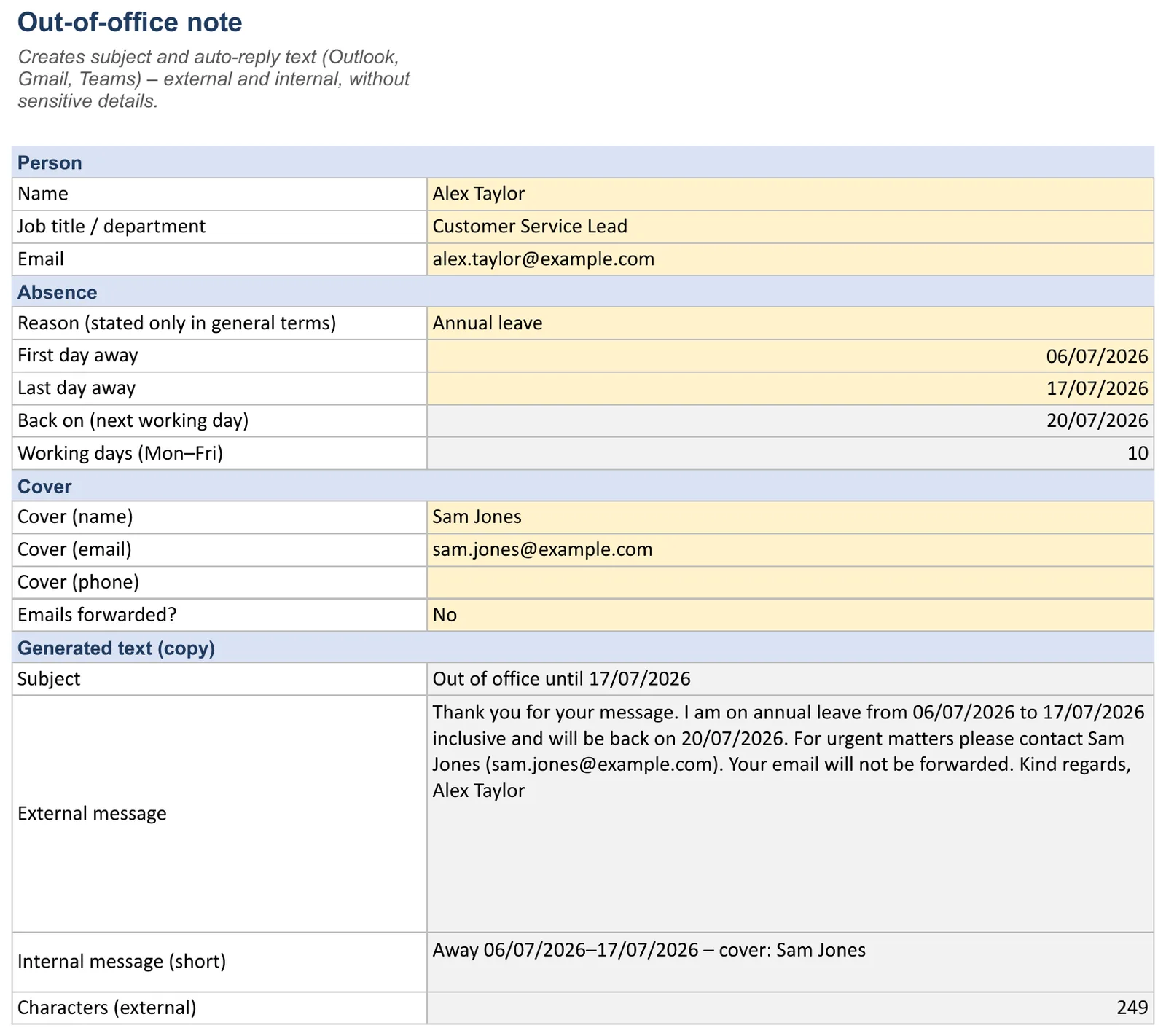
Fill in
- Name
- Job title / department
- Reason (stated only in general terms)
- First day away
- Last day away
- Cover (name)
- Cover (email)
- Cover (phone)
- Emails forwarded?
Automatic
- Back on (next working day)
- Working days (Mon–Fri)
- Subject
- External message
- Internal message (short)
- Characters (external)
Dropdowns
- Emails forwarded?: Yes, No
- Reason (stated only in general terms): Annual leave, Business trip, Training, Parental leave, Out of office
Last day is not before first day; Return date is a working day; Cover named with email; Cover email looks valid; No health details in the text
Read only – sources, links and notes.
How to fill in the template
How to fill in the template
- 1
Fill in the yellow fields on the “Absence note” sheet: name, reason, dates, cover.
- 2
The return date (next working day Mon–Fri) and messages are generated automatically.
- 3
Paste subject and text into Outlook (File › Automatic Replies), Gmail (Settings › Vacation responder) or Teams.
- 4
The “Checks” sheet flags missing or sensitive details.
- 5
Switch the note on on your last working day and off when you are back.
Calculations
How the template calculates
Working days (Mon–Fri)
counts working days, excluding weekends and listed holidays; moves a date by working days (deadline/return date)
=IF(OR($B$10="",$B$11="",$B$11<$B$10),"",WORKDAY($B$11,1))
Back on (next working day)
2026-07-20
External message
Thank you for your message. I am on annu
Cover email looks valid
counts or raises ⚠ warnings
Last day is not before first day
counts or raises ⚠ warnings
No health details in the text
counts or raises ⚠ warnings
Note
Leave is counted in working days – weekends and (where listed) bank holidays don’t count. Remaining = entitlement + carry-over − days taken. Checks flag overlaps, missing details or deadlines.
Quick tips
Fill in the yellow cells; grey cells calculate – don’t overwrite them. ✔ = OK, ⚠ = check. Enter times as hh:mm and dates as dates; add new dropdown values on the source sheet first. If you see #VALUE! or empty totals, press Ctrl+Z or reload the template.
Countries
Rules by country
Bank holidays and regions are on the holidays sheet when the workbook supports multiple countries.
verified·estimate·pending
United Kingdom
The “Legal basis” sheet refers to UK law (UK GDPR, ICO guidance).
Ireland
the EU GDPR applies (regulator: Data Protection Commission); health data is special-category data (Art. 9 GDPR) – never mention illness in an out-of-office message.
United States
the GDPR does not apply, but keep health details out anyway – under the ADA, medical information employers obtain must be kept confidential and in separate files (29 CFR 1630.14). Check the return date against your company holiday calendar.
Legal basis and sources
| Rule | Source |
|---|---|
| Data minimisation – share only what is needed | UK GDPR / GDPR Art. 5(1)(c) |
| Health data is special-category data | UK GDPR / GDPR Art. 9 |
| Monitoring and forwarding employee email: be transparent, follow your policy | ICO – Employment practices: monitoring workers |
Guidance only, not legal advice – contracts and collective agreements can differ. The file holds personal data (UK GDPR / GDPR): share it only with people who need it and delete it once the retention period ends.
Checks
Checks and dashboard
Last day is not before first day
Automatic check: Last day is not before first day
Return date is a working day
Automatic check: Return date is a working day
Cover named with email
Automatic check: Cover named with email
Cover email looks valid
Automatic check: Cover email looks valid
No health details in the text
Automatic check: No health details in the text
Formats
Excel or Google Sheets
Excel (.xlsx)
Calculate, check and archive on your computer – Excel 2016 or later, Microsoft 365.
- Calculates automatically
- Edit in Word
- Offline
Google Sheets
Use it in the browser and share it with your team – via File › Make a copy.
- Calculates automatically
- Edit in Word
- Offline
Print, share, save
Print: File › Print → A4 (UK, Ireland) or US Letter (US), choose orientation, scale “Fit to width”, repeat frozen rows.
PDF/Excel: File › Download › PDF or Microsoft Excel (.xlsx).
Your own copy: File › Make a copy. Share: “Share” top right – ideally “Viewer” for the team.
Limits of the template
Formula cells are only protected with a warning, and a spreadsheet keeps no change log: anyone who can open the file can edit it.
If several people need to plan or record at the same time, software such as Ordio is easier.
Related templates and tools
- Time trackingDigital alternative to Excel — start a free trial.
- TemplatesEvery free Excel and Google Sheets template in one place.
- Digital employee files in Ordio
- Payroll Template for Excel and Google SheetsEstimate a payslip with 2026/27 rates – for guidance, not a replacement for payroll software. Free to download for Excel and Google Sheets.
- Weekly Schedule Template – free for Word, PDF and ExcelFree weekly schedule template for Excel, Word and PDF: plan your team's week on one page, with hour totals, labour cost and break and rest checks.
- Time Tracking Template for Excel and Google SheetsRecord daily working time in an auditable way; breaks, overtime and legal limits are calculated automatically. Free to download for Excel and Google…
What is an out-of-office message and why do you need a template?
An out-of-office message (absence auto-reply) tells senders you are unavailable, on holiday, sick leave, or travelling. It sets expectations, cuts follow-up mail, and looks professional. An out-of-office template saves time: reuse proven text for Outlook, Gmail, or Microsoft 365 instead of rewriting each absence.
The Ordio out-of-office message template is an Excel workbook: enter dates, reason, and cover contact, copy the generated text, and paste it into your mail client. In a few minutes you have a consistent reply for customers, colleagues, and partners. With Ordio absence management you plan leave digitally; for formal requests, use the vacation request template. The auto-reply complements email; it does not replace HR approval workflows.
Regular absences benefit from a short, factual message, senders know whom to contact and when you return. Without it, clients may assume silence means neglect.
Download the free out-of-office message template and use it immediately in Outlook or other systems.
Further reading: Leave of absence explained.
Set up out-of-office in Outlook: step-by-step
An Outlook out-of-office template supplies the text, you paste it into Outlook’s automatic replies.
Outlook desktop (Windows/Mac): Go to File → Automatic Replies, turn on "Send automatic replies", set start and end dates, and enter your message. You can use different text for people inside and outside your organisation.
Outlook on the web (Microsoft 365): Open settings (gear) → Mail → Automatic replies, enable the switch, choose the period and audience.
Copy the text from the Ordio Excel file into the reply box. Activate on your last working day before leave, not so early that you miss mail that still needs a personal reply.
For teams using digital leave: Ordio absences shows who is away in scheduling; the email auto-reply informs external contacts.
Structure of a professional out-of-office message
A professional out-of-office message includes: greeting, thanks for the email, absence dates, cover contact (name and reachability), and a polite sign-off. Keep it factual, about 40-80 words, no personal medical detail, no emojis in formal contexts.
| Element | Content |
|---|---|
| Greeting | "Dear …" (external) or "Hello" (internal, if culture allows) |
| Thanks | "Thank you for your email." |
| Period | "From [date] to [date] I am out of the office." |
| Cover | "For urgent matters, contact [name] at [email] or [phone]." |
| Close | "Kind regards, [name]" |
For email addresses in the body, write "(at)" instead of @ to reduce scraping. The Ordio template lists all fields; cover details can also live in your employee files for HR consistency.
Internal vs. external: differences in wording
For external recipients (customers, vendors): use formal, neutral wording: "Dear Sir or Madam" or "Dear [Name]" and "Kind regards". Avoid slang and inside jokes.
For internal recipients (colleagues): you may use a friendlier tone: "Hi team", "Best": depending on company culture. Both versions should state dates and cover contact clearly.
Outlook and Microsoft 365 allow separate internal and external replies. External gets the polished version; internal can be shorter. The Ordio template has space for both.
For international contacts, add an English "Out of office" variant if you receive mail in multiple languages.
Tips and common mistakes
Tips: Activate on the last working day before leave; check spelling and year in dates; keep text short; name a specific cover person; use (at) for email addresses in the body.
Mistakes: Oversharing health or location; emojis in client-facing replies; forgetting to set an end date; no cover contact; replies so long that mobile clients truncate them.
Enable internal auto-reply too: colleagues then see cover details without guessing.
English-only reply? Useful if you regularly get international mail; many clients allow separate internal and external languages.
Weak and strong out-of-office lines
| Weak | Strong | Why it works |
|---|---|---|
| "I'm off sick, not sure when I'll be back." | "I'm out of the office until Friday 24 October." | No health details: illness is special-category data (UK GDPR Art. 9). |
| "Contact the team if urgent." | "For anything urgent, Priya Shah can help: priya.shah@example.co.uk, 020 7946 0000." | A named person saves the sender a second email. |
| "I'll reply ASAP." | "I'll reply when I'm back on Monday 27 October." | A real date sets a clear expectation. |
| "Back on the 31st." | "Back on Friday 31 October 2026." | Weekday plus date avoids confusion between UK and US date formats. |
Three situations that need different wording
Annual leave. Short and neutral. Give the return date and one cover contact.
Thank you for your email. I'm on leave until Friday 24 October and won't be checking messages. For urgent questions please contact Priya Shah at priya.shah@example.co.uk. Kind regards, Sam
Conference or business trip. You can say you have limited access, but only promise what you will really do: "I'm at a trade fair this week and will reply in the evenings."
Leaving the company. Say that you have left, give the new contact, and agree with IT how long the mailbox stays open. Don't set up forwarding to a private address: the mailbox holds company and customer data.
Before you switch it on
- Test it by sending yourself an email from a personal account, so you see what external senders get.
- Set separate internal and external replies if your mail system allows it. Internal messages can be more informal and mention the project handover.
- Tell your cover person you have named them, and give them access to shared folders before you go.
- In the US, the GDPR does not apply, but keep medical reasons out anyway: under the ADA, medical information employers obtain has to be kept confidential (29 CFR 1630.14).
For managers
Agree a standard wording for the team, so customers get the same tone from everyone. Keep reasons out of shared calendars too: "Out of office" is enough, whether the person is on holiday, ill or on parental leave.
Internal version
For colleagues you can be more direct: "Off until Monday. The supplier invoices are in the shared folder under October, and Priya has the login for the booking system." Say where the work is, not just who covers it. That one sentence often saves your cover person half an hour of searching. Switch it off on your first morning back.
Manage absences with Ordio
Automatic balances and approvals save time
Automatic leave calculation
Track entitlements without manual spreadsheets
Digital approvals
Submit and approve leave requests online, no paperwork
Overview for everyone
Staff see balances; managers approve in one click
Linked to scheduling
Approved leave updates shift plans automatically
With Ordio:
See how Ordio digitizes leave management
See digital approvals simplify your workflow · No obligation · 15 minutes
More free templates
Discover more Excel templates for planning, time tracking and HR.
Frequently asked questions about Out-of-Office Note
What is an out-of-office message and why do you need a template?
An out-of-office message (absence auto-reply) tells senders you are unavailable, on holiday, sick leave, or travelling. It sets expectations, cuts follow-up mail, and looks professional. An out-of-office template saves time: reuse proven text for Outlook, Gmail, or Microsoft 365 instead of rewriting each absence.
What belongs to a professional absence notice?
Cover letter, thanks for the message, absence period, representation (name and contact) and final formula. Short and objective - 40 to 80 words. No personal details, no emoticons. For e-mail addresses in the representation: (at) instead of @, which reduces spam. The Ordio template contains all fields structured - you fill them out and copy the text.
How do I set an absence in Outlook?
Outlook Desktop: File → Automatic answers, enable, set start and end date, enter text. Outlook Online: Gear → E-Mail → Automatic Answers, Activate Switch, Select Period. You can use different texts for internal and external recipients. The Ordio template delivers the finished text - you copy it and insert it.
Is the out-of-office message template free, and does it work in Excel and Google Sheets?
Yes. You download it free of charge after a short form and get an Excel file (.xlsx, Excel 2016 or Microsoft 365) and a Google Sheets copy. Excel and Sheets contain the same 5 sheets: Instructions, Absence note, Checks, Legal basis, Ordio.
Which countries does the template cover?
The template covers the United Kingdom, Ireland and the United States. The country notes in the file set out the rules for each: United Kingdom: The “Legal basis” sheet refers to UK law (UK GDPR, ICO guidance). Ireland: the EU GDPR applies (regulator: Data Protection Commission); health data is special-category data (Art. 9 GDPR) – never mention illness in an out-of-office note. United States: the GDPR does not apply, but keep health details out anyway – under the ADA, medical information employers obtain must be kept confidential and in separate files (29 CFR 1630.14). Check the return date against your company holiday calendar. Note: Guidance only, not legal advice. Status: October 2026.