Templates
Proof of Hours Worked Template for Excel and Google Sheets
Release
Version 2026.10
Markets
- GB
- IE
- US
Formats
- Excel (.xlsx)
- Google Sheets
Editable files: free, after a short form
Overview
At a glance
Sheets
6
Checks
3
Charts
3
Holiday years
2026
Countries
United Kingdom · Ireland · United States
Formula cells
328
Sheets
What's in the template
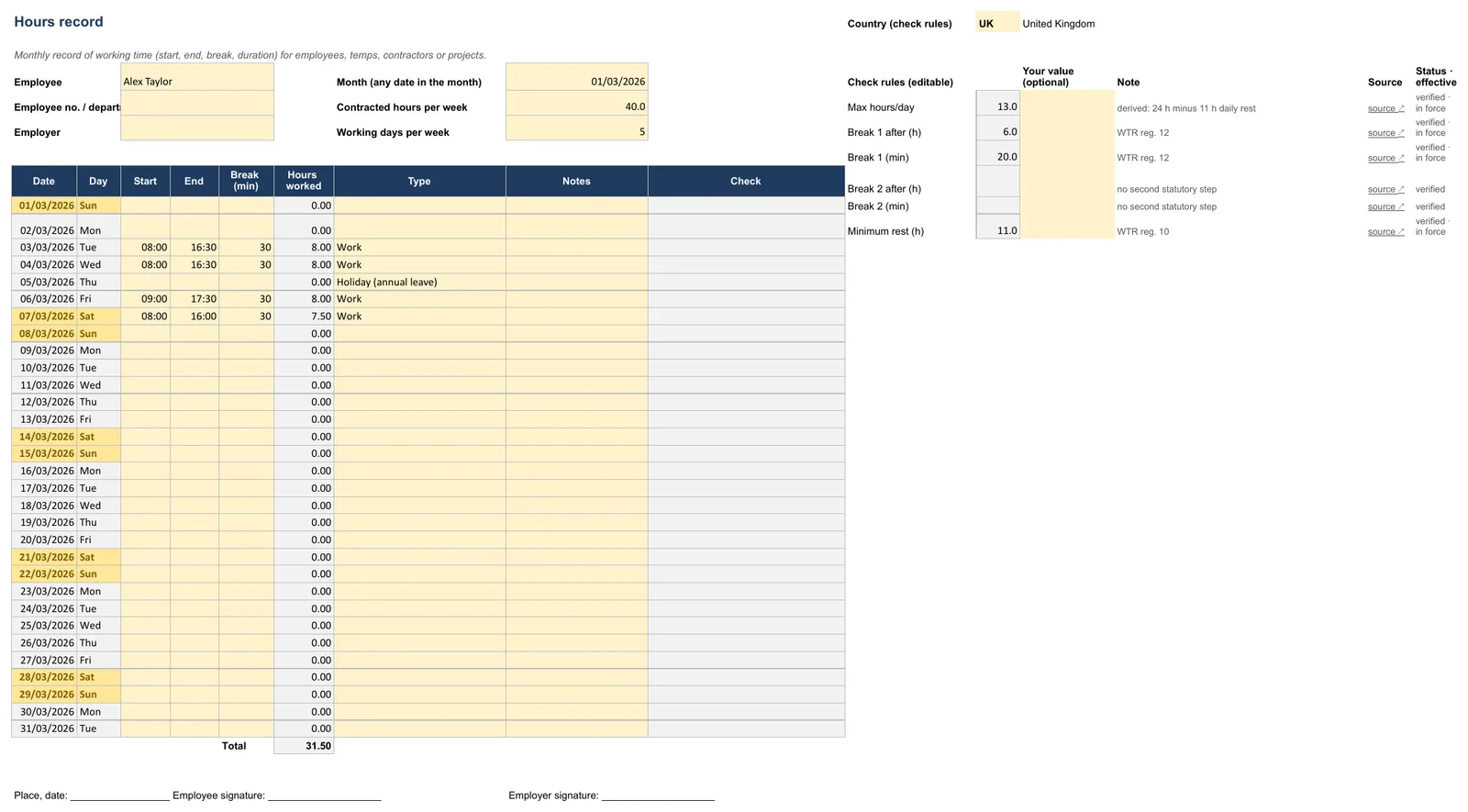
Fill in
- Employee
- Employee no. / department
- Employer
- Date
- Start
- End
- Break (min)
- Type
- Country (check rules)
- Month (any date in the month)
- Contracted hours per week
- Max hours/day
- Working days per week
- Break 1 after (h)
- Break 1 (min)
- Break 2 after (h)
- Notes
- Break 2 (min)
- Minimum rest (h)
Automatic
- Day
- Hours worked
- Check
Dropdowns
Type: Work, Holiday (annual leave), Sick, Bank holiday, Training, Other
Automatic
- Employee
- Month
- Hours worked
- Annual leave days
- Sick days
- Bank holidays (Mon–Fri)
- Target hours (Mon–Fri, excl. bank holidays)
- Credited hours (leave/sick)
- Balance (worked + credited – target)
- Days with a warning
Automatic
worked, credited (leave/sick), target and balance per calendar week, running balance, days with ⚠ per week with a traffic light – with charts. Nothing to fill in.
Read only – sources, links and notes.
How to fill in the template
How to fill in the template
- 1
Fill in the header on the “Hours record” sheet: name, month, weekly hours, working days per week. Top right (L1): choose the country (UK, IE, US) – the check rules follow the country; enter different values (contract, collective agreement, US state law) in column M.
- 2
Enter start, end (hh:mm) and break in minutes for each day. Night shifts past midnight are calculated correctly.
- 3
Choose a type (Work, Holiday, Sick, Bank holiday …).
- 4
The “Check” column flags breaks, daily rest and maximum hours for the country chosen in L1. Override any rule in column M, e.g. for a collective agreement or state law.
- 5
The “Overview” sheet shows totals, target and balance. Print and sign at month end; keep records for at least 2 years (WTR reg. 9).
Calculations
How the template calculates
Working time
Working time = end minus start minus break. Midnight crossings are corrected automatically.
Working time = end minus start minus break
Balance
Sum of hours and credits versus the monthly target — overtime or shortfall.
Breaks and maximum hours
Each row is checked against the selected country’s break and maximum-hours rules.
Daily rest
Rest between days is compared with the country minimum (11 hours in the template).
Working days
Counts days with working time greater than zero.
=COUNTIF(Timesheet!I7:I37,">0")
Average hours per working day
Total hours divided by working days. Returns 0 when there are no working days.
=IFERROR(B4/B8,0)
Quick tips
Fill in the yellow cells; grey cells calculate – don’t overwrite them. ✔ = OK, ⚠ = check. Enter times as hh:mm and dates as dates; add new dropdown values on the source sheet first. If you see #VALUE! or empty totals, press Ctrl+Z or reload the template.
Countries
Rules by country
Bank holidays for UK, Ireland and US defaults are on the holidays sheet; add Scotland, NI or US states as needed. Sources are listed on the Legal sheet.
| Rule | United Kingdom | Ireland | United States |
|---|---|---|---|
| Notice above h/day | 8 ✔ – guide value ↗ | – ✔ – no statutory daily norm ↗ | – ✔ – no federal daily limit ↗ |
| Maximum h/day | 13 ✔ – derived: 24 h minus 11 h daily rest ↗ | 13 ✔ – derived: 24 h minus 11 h daily rest (OWTA s. 11) ↗ | – ✔ – no federal daily limit (24 = no check) ↗ |
| Notice above h/week | 48 ✔ – 48 h average over 17 weeks (opt-out possible) ↗ | 48 ✔ – 48 h average, usually over 4 months (OWTA s. 15) ↗ | 40 ✔ – FLSA: overtime at 1.5× above 40 h/workweek ↗ |
| Maximum h/week | – ✔ – no statutory weekly maximum (average only) ↗ | – ✔ – average limit only ↗ | – ✔ – no federal weekly limit for 16+ ↗ |
| Minimum daily rest h | 11 ✔ – WTR reg. 10 ↗ | 11 ✔ – OWTA s. 11 ↗ | – ✔ – no federal rest-period rule (0 = no check) ↗ |
| Break 1 above h | 6 ✔ – WTR reg. 12 ↗ | 4.5 ✔ – OWTA s. 12: 15 min after 4.5 h ↗ | – ✔ – no federal break requirement (24 = no check) ↗ |
| Break 1 min | 20 ✔ – WTR reg. 12 ↗ | 15 ✔ – OWTA s. 12 ↗ | 0 ✔ – no federal break requirement ↗ |
| Break 2 above h | – ✔ – no second statutory step ↗ | 6 ✔ – OWTA s. 12: 30 min after 6 h (incl. first 15) ↗ | – ✔ – ↗ |
| Break 2 min | – ✔ – no second statutory step ↗ | 30 ✔ – OWTA s. 12 ↗ | – ✔ – ↗ |
| Federal minimum wage $/h | 12.71 £/h ✔ · 2026-04-01 – NMW Regs; lower rates under 21 ↗ | 14.15 €/h ✔ · 2026-01-01 · ⏳ 2027 – 19: 12.74 · 18: 11.32 · under 18: 9.91; from 1 Jan 2027 €14.94 announced (needs legislation) ↗ | 7.25 $/h ✔ · 2009-07-24 – state/local minimum wage applies if higher ↗ |
| Annual leave days | 28 ✔ – 5.6 weeks, may include bank holidays ↗ | 20 ✔ – 4 working weeks (or 8% of hours worked); leave year Apr–Mar ↗ | – ✔ – no federal paid-vacation requirement ↗ |
✔ verified · ⚠ approximation or still to be confirmed · ⏳ announced, not yet in force
Working week
48 hours on average over 17 weeks (unless opted out)
Working Time Regulations 1998 (new tab)Rest breaks
20 minutes when working more than 6 hours
GOV.UK — rest breaks (new tab)Daily rest
11 hours between working days
GOV.UK — rest between shifts (new tab)Minimum wage
National Living Wage / National Minimum Wage — see GOV.UK for the current rate
GOV.UK — National Minimum Wage (new tab)Records
Employers must keep adequate working time records
Acas — working time (new tab)
Working week
48 hours on average over a reference period (typically 4 months)
Organisation of Working Time Act 1997 (new tab)Rest breaks
15 minutes after 4½ hours; 30 minutes when working more than 6 hours
Daily rest
11 consecutive hours in each 24-hour period
Minimum wage
National Minimum Wage — see Citizens Information for the current rate
Citizens Information (new tab)
Overtime
Non-exempt employees: 1.5× regular rate after 40 hours in a workweek (FLSA)
DOL — overtime pay (new tab)Recordkeeping
Employers must keep payroll records with hours worked each day and week
DOL — FLSA recordkeeping (new tab)Minimum wage
Federal minimum wage $7.25/hour; many states set higher rates
DOL — minimum wage (new tab)Meal and rest breaks
No federal requirement; follow state law where it applies
Workbook flags vary by state — confirm locally.
Legal basis and sources
| Rule | Source |
|---|---|
| Average 48 h/week over 17 weeks (opt-out possible) | Working Time Regulations 1998, reg. 4 |
| Daily rest 11 consecutive hours | WTR 1998, reg. 10 |
| Weekly rest 24 h (or 48 h per fortnight) | WTR 1998, reg. 11 |
| Rest break 20 min if the working day exceeds 6 h | WTR 1998, reg. 12 |
| Annual leave 5.6 weeks (28 days for a 5-day week) | WTR 1998, regs. 13 & 13A |
| National Living Wage £12.71/h (21+, from 1 Apr 2026) | NMW (Amendment) Regulations 2026 |
| Bank holidays | GOV.UK |
| Federal holidays (observed dates) | OPM |
Guidance only, not legal advice – contracts and collective agreements can differ. The file holds personal data (UK GDPR / GDPR): share it only with people who need it and delete it once the retention period ends.
Checks
Checks and dashboard
Worked, credited and target hours per week
Running balance (h)
Days with ⚠ per week
Formats
Excel or Google Sheets
Excel (.xlsx)
Calculate, check and archive on your computer – Excel 2016 or later, Microsoft 365.
- Calculates automatically
- Edit in Word
- Offline
Google Sheets
Use it in the browser and share it with your team – via File › Make a copy.
- Calculates automatically
- Edit in Word
- Offline
Print, share, save
Print: File › Print → A4 (UK, Ireland) or US Letter (US), choose orientation, scale “Fit to width”, repeat frozen rows.
PDF/Excel: File › Download › PDF or Microsoft Excel (.xlsx).
Your own copy: File › Make a copy. Share: “Share” top right – ideally “Viewer” for the team.
Limits of the template
Values marked ⚠ or ⏳ on the settings sheet are approximations or announced changes. Check them before use: Ireland: national minimum wage €14.15 an hour (2026); Budget 2027 announced €14.94 from 1 January 2027, which still needs a ministerial order, so check before use.
Formula cells are only protected with a warning, and a spreadsheet keeps no change log: anyone who can open the file can edit it.
If several people need to plan or record at the same time, software such as Ordio is easier.
Related templates and tools
- Time trackingWhen one spreadsheet per person is not enough, track hours in Ordio.
- Timesheet Template – free for Word, PDF and ExcelMonthly timesheet with totals and compliance checks.
- TemplatesEvery free Excel and Google Sheets template in one place.
- Attendance List Template – free for Word, PDF and ExcelTrack daily who was present, sick or on leave, with hours and an attendance rate per person. Free to download for Excel, Google Sheets, Word and PDF.
- Shift Plan Template for Excel and Google SheetsAssign early, late and night shifts across your team, with hours, cost and rest periods checked automatically. Free to download for Excel and Google…
- Time Tracking Template for Excel and Google SheetsRecord daily working time in an auditable way; breaks, overtime and legal limits are calculated automatically. Free to download for Excel and Google…
Proof of hours worked template: what is an proof of hours worked, and how is it different from a timesheet?
In short: An proof of hours worked (hours record) documents working time over a fixed period, often a month or pay cycle. Unlike a single-day slip, the focus is traceability, totals, and the question: How many hours actually occurred in this period, including break logic? The free Ordio proof of hours worked template in Excel and Google Sheets gives you that structure without building formulas from scratch.
Further reading: Timesheet calculator.
Proof of hours worked, timesheet, and payroll, not the same
Many searches mix timesheets, proof of hours workeds, and broader time-tracking templates. A clear split helps you choose the right file:
| Document | Typical focus | Matching Ordio template |
|---|---|---|
| Proof of hours worked | Period (e.g. month), sums, transparency for payroll | This proof of hours worked template |
| Timesheet | Daily or weekly lines, breaks, day types | timesheet Excel template |
| Time tracking workbook | Broader capture module with rules and overviews | time tracking Excel template |
| Payroll | Gross/net pay and deductions, not an hours log | payroll template |
If you need many days in one block with monthly totals, this template is built for that. For definitions and practice questions, see the proof of hours worked overview on our templates hub.
Why use an proof of hours worked template in Excel or Google Sheets?
Practical value: A template saves layout and formula work. You enter date, start, end, break, and day type, the sheet calculates net hours and rolls up the period on an overview tab. That reduces common errors (wrong SUM ranges, missing break fields) when you prepare proof for a manager, client, or payroll.
When a template is enough, and when software helps
- Template is often enough: Few employees, predictable months, you want structure before buying tools.
- Software makes sense: Multiple sites, shift swaps, approvals, payroll interfaces, then digital time tracking like Ordio collects and evaluates hours centrally.
- Combination: Many teams start in Excel and move when manual upkeep becomes costly.
The workbook includes a short guide sheet so fields are self-explanatory. Proof stays readable for people who were not at the shift.
Tips for clean records
Enter times daily or weekly. Use the notes column for exceptions (training, travel). Use separate files per employer if someone has two jobs. Before submitting, sanity-check calendar days, breaks, and duplicate dates. For one-off hour checks, try the working time calculator; the template remains your period log.
For planning alongside documentation, see employee scheduling the proof of hours worked template stays the lightweight record for what was worked.
Excel, Word, and timesheet templates: common search questions
People often ask whether an proof of hours worked is the same as a timesheet in Excel or Word. Yes, many providers offer hour logs; quality and formulas vary. If you need day-by-day capture with breaks, the timesheet Excel template may fit better. This page focuses on monthly proofs and totals; you can use both, but submit the document your payroll process expects.
Who asks for an proof of hours worked
An proof of hours worked is the summary of what someone actually worked in a period. In practice it is requested in four situations:
- Payroll for hourly staff. In the UK, when pay depends on time worked, the payslip has to show the hours paid (Employment Rights Act 1996, s. 8(2)(e)). The proof of hours worked is the source for that figure.
- Agency and client work. A temp or freelancer has the client sign the hours so the agency can invoice and pay.
- Disputes about pay or rest. In Ireland, an employer who has no records of working time has to prove compliance itself (Organisation of Working Time Act 1997, s. 25).
- A second job. Young workers' limits in the UK (8 hours a day, 40 a week) count hours for every employer together (WTR reg. 5A).
Worked example: a student on the National Living Wage
Sam is 21, works in a café and is paid £12.71 an hour, the National Living Wage from 1 April 2026. In May Sam records 62 hours on the hours record. Gross pay is 62 × £12.71 = £788.02. If Sam's payslip shows fewer hours or a lower rate, the proof of hours worked is the evidence for the correction.
How long to keep it
| Country | Record | Minimum period |
|---|---|---|
| United Kingdom | Working-time records | 2 years (WTR reg. 9) |
| Ireland | Records showing compliance with the OWTA | 3 years (s. 25) |
| United States | Time cards with daily start and stop times | 2 years (29 CFR § 516.6) |
| United States | Payroll records, incl. hours per workday and workweek | 3 years (§§ 516.2, 516.5) |
Getting the hours signed off
- Close the period on the same day each month, for example the last working day.
- Check that the "Running balance" makes sense, and that days with ⚠ have an explanation in the notes.
- Save the month as a PDF and get it signed by the worker and by the manager or client.
- Send it to payroll in the same way every month and keep the signed copy.
Where proof of hours workeds go wrong
- Breaks are left blank. The proof then shows the whole time on site as working time.
- Short paid breaks are deducted for US staff. Rest breaks of about 5 to 20 minutes count as hours worked under the FLSA (29 CFR § 785.18).
- A shift past midnight is split across two days by hand and counted twice.
- The worker signs, but nobody on the employer side does. A one-sided proof carries less weight if the hours are questioned.
Record hours with Ordio
Automated payroll exports save hours every week
Automated payroll export
Hours flow into payroll without manual re-entry
Workplace-ready time capture
Checks for breaks, rest periods, and working-time rules (Germany: ArbZG)
Mobile clock-in
Staff clock in/out on mobile, works offline too
Real-time reporting
See hours and overtime as they happen
With Ordio:
See how Ordio automates your scheduling
Watch automatic checks save planning time · No obligation · 15 minutes
More free templates
Discover more Excel templates for planning, time tracking and HR.
Frequently asked questions about Hours Proof
What counts as proof of hours worked?
A record made at the time showing the dates, start and finish times, breaks and totals, signed by the worker and the manager or client. A timesheet, clock-in data or a monthly hours record all work; payslips showing hours paid support it.
Do I need an hours record for a part-time role?
Part-time and variable-hour roles benefit from transparent hours so pay matches work done. In the US, check federal minimum wage and FLSA overtime for covered employees; in the UK, confirm National Minimum Wage and Working Time Regulations. Whether you must keep proof depends on contract and role, this is not legal advice. Use this template to list hours clearly.
Does the template cover night shifts crossing midnight?
No this hours proof template assumes start and end on the same calendar day. Night shifts over midnight are not modelled separately. For complex patterns, consider digital time tracking and confirm rest rules under UK Working Time Regulations and US state or federal requirements.
What is the difference between a proof of hours worked and a timesheet?
A timesheet typically logs hours per day or week (start, end, breaks). An proof of hours worked emphasises the documented total over a period, often with a monthly sum and traceable daily lines. The template on this page is built for proof and overview when you hand hours to payroll or a client.
Is the proof of hours worked template free, and does it work in Excel and Google Sheets?
Yes. You download it free of charge after a short form and get an Excel file (.xlsx, Excel 2016 or Microsoft 365) and a Google Sheets copy. Excel and Sheets contain the same 6 sheets: Instructions, Hours record, Overview, Dashboard, Legal basis, Ordio.
Which countries does the template cover?
The template covers the United Kingdom, Ireland and the United States. The country notes in the file set out the rules for each: United Kingdom: Default. Working Time Regulations 1998: 20-min break if the day exceeds 6 h (reg. 12), 11 h daily rest (reg. 10), 48 h average week (reg. 4, opt-out possible). Max 13 h/day is derived from the daily rest rule. Ireland: Organisation of Working Time Act 1997: breaks 15 min after 4.5 h and 30 min after 6 h (s. 12), 11 h daily rest (s. 11), 48 h average week (s. 15). Mark public holidays as “Bank holiday” in the Type column. United States: Federal baseline (FLSA): no federal break, daily rest or daily-hours rule, so these checks are switched off (24 h / 0 h). Overtime at 1.5× above 40 h/workweek is not checked here. ⚠ Many states have their own rules – enter them in column M.