Templates
Annual Leave Planner Template for Excel and Google Sheets
Release
Version 2026.10
Markets
- UK
- IE
- US
Formats
- Excel (.xlsx)
- Google Sheets
Editable files: free, after a short form
At a glance
At a glance
Formats
Excel (.xlsx), Google Sheets
Countries
United Kingdom, Ireland and United States
Charts
2
Public holidays
2026–2028
Legal status
Guidance, not legal advice (checked October 2026)
What's in the template
What's in the template
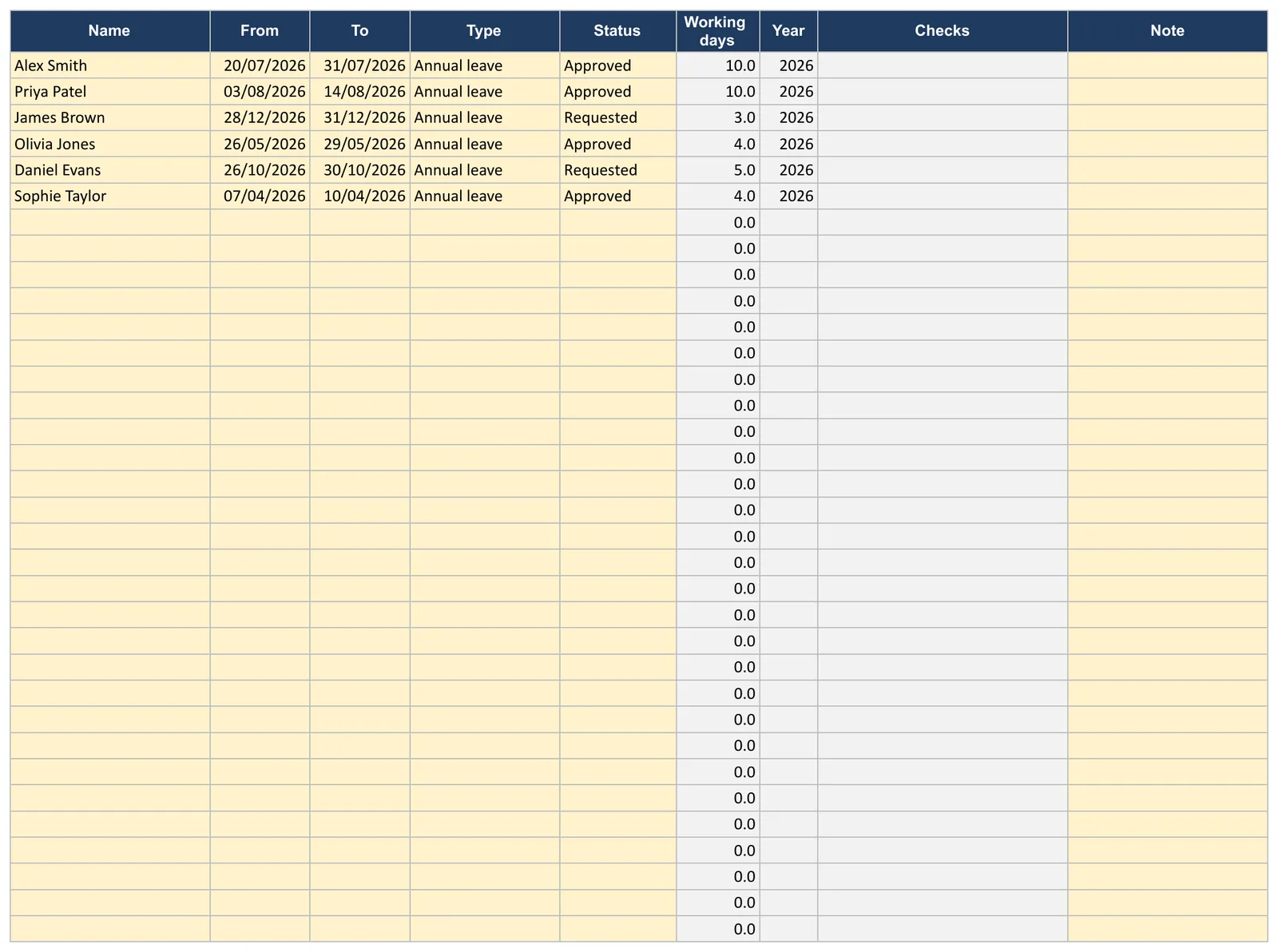
Fill in
- Name
- From
- To
- Type
- Status
- Note
Automatic
- Working days
- Year
- Checks
Dropdowns
- Type: Annual leave, Special leave, Unpaid, Time off in lieu
- Name: choose from sheet “Employees”
- Status: Requested, Approved, Declined
Fill in
- Name
- Entitlement (days)
- Carried over
- Department
Automatic
- Entitlement (days)
- Carried over
- Taken (approved)
- Requested (pending)
- Remaining
- % used
- Checks
Automatic
- January
- Absent
- February
- March
- April
- May
Automatic
team KPIs (entitlement, taken, remaining), absence days per month, overlap warning, heatmap “people absent per day”, remaining leave per person – with charts. Only the threshold (yellow) can be changed.
Fill in
- Country (UK, IE, US)
- Region (ENG, WLS, SCT, NIR or “–”)
- Year
- your own values in column D (override the defaults)
Automatic
leave entitlement and check values per country with source
Dropdowns
- Country: UK, IE, US
- Region: ENG, WLS, SCT, NIR, –
Fill in
- Date
- Name
- Region (bank holidays)
Automatic
- active
- Date active
How to fill in the template
How to fill in the template
- 1
On “Settings” choose the country (UK, IE, US), region (ENG, WLS, SCT, NIR or “–”) and year – bank holidays and the default leave entitlement follow the country (UK 28 days incl. bank holidays, IE 20, US none by federal law). Enter different values in column D.
- 2
On “Employees” enter names, entitlement and days carried over. Leave the entitlement blank to use the country default from “Settings”.
- 3
On “Requests” pick the employee from the list and enter from/to, type and status. Working days exclude weekends and bank holidays.
- 4
On “Balances” see taken, requested and remaining days per person – ⚠ if entitlement is exceeded.
- 5
On “Calendar” see all 12 months of the selected year; L = approved, (L) = requested, WE/BH = weekend/bank holiday. The “Absent” row shows how many people are off each day.
How the template calculates
How the template calculates
Formulas
Leave is counted in working days – weekends and (where listed) bank holidays don’t count. Remaining = entitlement + carry-over − days taken. Checks flag overlaps, missing details or deadlines.
Remaining = entitlement + carry-over − days taken
Quick tips
Fill in the yellow cells; grey cells calculate – don’t overwrite them. ✔ = OK, ⚠ = check. Enter times as hh:mm and dates as dates; add new dropdown values on the source sheet first. If you see #VALUE! or empty totals, press Ctrl+Z or reload the template.
Rules by country
Rules by country
| Rule | United Kingdom | Ireland | United States |
|---|---|---|---|
| Notice above h/day | 8 ✔ – guide value ↗ | – ✔ – no statutory daily norm ↗ | – ✔ – no federal daily limit ↗ |
| Maximum h/day | 13 ✔ – derived: 24 h minus 11 h daily rest ↗ | 13 ✔ – derived: 24 h minus 11 h daily rest (OWTA s. 11) ↗ | – ✔ – no federal daily limit (24 = no check) ↗ |
| Notice above h/week | 48 ✔ – 48 h average over 17 weeks (opt-out possible) ↗ | 48 ✔ – 48 h average, usually over 4 months (OWTA s. 15) ↗ | 40 ✔ – FLSA: overtime at 1.5× above 40 h/workweek ↗ |
| Maximum h/week | – ✔ – no statutory weekly maximum (average only) ↗ | – ✔ – average limit only ↗ | – ✔ – no federal weekly limit for 16+ ↗ |
| Minimum daily rest h | 11 ✔ – WTR reg. 10 ↗ | 11 ✔ – OWTA s. 11 ↗ | – ✔ – no federal rest-period rule (0 = no check) ↗ |
| Break 1 above h | 6 ✔ – WTR reg. 12 ↗ | 4.5 ✔ – OWTA s. 12: 15 min after 4.5 h ↗ | – ✔ – no federal break requirement (24 = no check) ↗ |
| Break 1 min | 20 ✔ – WTR reg. 12 ↗ | 15 ✔ – OWTA s. 12 ↗ | 0 ✔ – no federal break requirement ↗ |
| Break 2 above h | – ✔ – no second statutory step ↗ | 6 ✔ – OWTA s. 12: 30 min after 6 h (incl. first 15) ↗ | – ✔ – ↗ |
| Break 2 min | – ✔ – no second statutory step ↗ | 30 ✔ – OWTA s. 12 ↗ | – ✔ – ↗ |
| Federal minimum wage $/h | 12.71 £/h ✔ · 2026-04-01 – NMW Regs; lower rates under 21 ↗ | 14.15 €/h ✔ · 2026-01-01 · ⏳ 2027 – 19: 12.74 · 18: 11.32 · under 18: 9.91; from 1 Jan 2027 €14.94 announced (needs legislation) ↗ | 7.25 $/h ✔ · 2009-07-24 – state/local minimum wage applies if higher ↗ |
| Annual leave days | 28 ✔ – 5.6 weeks, may include bank holidays ↗ | 20 ✔ – 4 working weeks (or 8% of hours worked); leave year Apr–Mar ↗ | – ✔ – no federal paid-vacation requirement ↗ |
✔ verified · ⚠ approximation or still to be confirmed · ⏳ announced, not yet in force
Länderhinweis
Region = ENG, WLS, SCT or NIR (bank holidays).
Notice above h/day
8 – guide value
gov (new tab)Maximum h/day
13 – derived: 24 h minus 11 h daily rest
gov (new tab)Notice above h/week
48 – 48 h average over 17 weeks (opt-out possible)
gov (new tab)Maximum h/week
– – no statutory weekly maximum (average only)
gov (new tab)Minimum daily rest h
11 – WTR reg. 10
gov (new tab)Break 1 above h
6 – WTR reg. 12
gov (new tab)Break 1 min
20 – WTR reg. 12
gov (new tab)Break 2 above h
– – no second statutory step
gov (new tab)Break 2 min
– – no second statutory step
gov (new tab)Federal minimum wage $/h
12.71 £/h · 2026-04-01 – NMW Regs; lower rates under 21
gov (new tab)Annual leave days
28 – 5.6 weeks, may include bank holidays
gov (new tab)
Notice above h/day
– – no statutory daily norm
citizensinformation (new tab)Maximum h/day
13 – derived: 24 h minus 11 h daily rest (OWTA s. 11)
irishstatutebook (new tab)Notice above h/week
48 – 48 h average, usually over 4 months (OWTA s. 15)
citizensinformation (new tab)Maximum h/week
– – average limit only
citizensinformation (new tab)Minimum daily rest h
11 – OWTA s. 11
citizensinformation (new tab)Break 1 above h
4.5 – OWTA s. 12: 15 min after 4.5 h
citizensinformation (new tab)Break 1 min
15 – OWTA s. 12
citizensinformation (new tab)Break 2 above h
6 – OWTA s. 12: 30 min after 6 h (incl. first 15)
citizensinformation (new tab)Break 2 min
30 – OWTA s. 12
citizensinformation (new tab)Federal minimum wage $/h
14.15 €/h · 2026-01-01 · 2027 – 19: 12.74 · 18: 11.32 · under 18: 9.91; from 1 Jan 2027 €14.94 announced (needs legislation)
citizensinformation (new tab)Annual leave days
20 – 4 working weeks (or 8% of hours worked); leave year Apr – Mar
citizensinformation (new tab)
Länderhinweis
Region “–”. Federal holidays (observed dates) are listed; private employers are not required to give them. No federal paid-leave entitlement – enter your policy or state law per person on “Employees”.
Notice above h/day
– – no federal daily limit
dol (new tab)Maximum h/day
– – no federal daily limit (24 = no check)
dol (new tab)Notice above h/week
40 – FLSA: overtime at 1.5× above 40 h/workweek
dol (new tab)Maximum h/week
– – no federal weekly limit for 16+
dol (new tab)Minimum daily rest h
– – no federal rest-period rule (0 = no check)
dol (new tab)Break 1 above h
– – no federal break requirement (24 = no check)
dol (new tab)Break 1 min
0 – no federal break requirement
dol (new tab)Break 2 above h
– –
dol (new tab)Break 2 min
– –
dol (new tab)Federal minimum wage $/h
7.25 $/h · 2009-07-24 – state/local minimum wage applies if higher
dol (new tab)Annual leave days
– – no federal paid-vacation requirement
dol (new tab)
Public holidays 2026–2028
| Country | 2026 | 2027 | 2028 |
|---|---|---|---|
| United Kingdom | 16 | 16 | 15 |
| Ireland | 10 | 10 | 10 |
| United States | 11 | 12 | 10 |
Sources: UK – GOV.UK bank holidays; IE – Workplace Relations Commission / Citizens Information; US – OPM federal holidays incl. observed dates (private employers are not required to observe them). Add company holidays in the yellow rows 49–88 (region “|ALL|” or a code).
Legal basis and sources
| Rule | Source |
|---|---|
| Average 48 h/week over 17 weeks (opt-out possible) | Working Time Regulations 1998, reg. 4 |
| Daily rest 11 consecutive hours | WTR 1998, reg. 10 |
| Weekly rest 24 h (or 48 h per fortnight) | WTR 1998, reg. 11 |
| Rest break 20 min if the working day exceeds 6 h | WTR 1998, reg. 12 |
| Annual leave 5.6 weeks (28 days for a 5-day week) | WTR 1998, regs. 13 & 13A |
| National Living Wage £12.71/h (21+, from 1 Apr 2026) | NMW (Amendment) Regulations 2026 |
| Bank holidays | GOV.UK |
| Federal holidays (observed dates) | OPM |
Guidance only, not legal advice – contracts and collective agreements can differ. The file holds personal data (UK GDPR / GDPR): share it only with people who need it and delete it once the retention period ends.
Checks and dashboard
Checks and dashboard
Dashboard charts
Formats
Excel, Google Sheets, PDF or Word
- Recommended
Excel (.xlsx)
Calculate, check and archive on your computer – Excel 2016 or later, Microsoft 365.
Google Sheets
Use it in the browser and share it with your team – via File › Make a copy.
Print, share, save
Print: File › Print → A4 (UK, Ireland) or US Letter (US), choose orientation, scale “Fit to width”, repeat frozen rows.
PDF/Excel: File › Download › PDF or Microsoft Excel (.xlsx).
Your own copy: File › Make a copy. Share: “Share” top right – ideally “Viewer” for the team.
Limits of the template
Public holidays cover 2026–2028. Add later years to the list yourself.
Values marked ⚠ or ⏳ on the settings sheet are approximations or announced changes. Check them before use: Ireland: national minimum wage €14.15 an hour (2026); Budget 2027 announced €14.94 from 1 January 2027, which still needs a ministerial order, so check before use.
Formula cells are only protected with a warning, and a spreadsheet keeps no change log: anyone who can open the file can edit it.
If several people need to plan or record at the same time, software such as Ordio is easier.
Related templates and tools
- Absence management in Ordio
- Duty Roster Template for Excel and Google SheetsFree duty roster Excel template for Excel or Google Sheets. FLSA and UK hour checks, industry presets, hour totals, CSV export for staff rotas.
- Holiday Request Form Template – free for Word, PDF and ExcelFree vacation & leave request template for Excel & Google Sheets: working-day calculator, PTO, UK annual leave, sample emails, PDF export. No signup.
- Shift Plan Template for Excel and Google SheetsFree shift plan and shift schedule Excel template for rotating teams. Excel or Google Sheets, FLSA and UK checks, 3-shift and 24/7 cover, hour totals…
- Internship Report Template – free for Word, PDF and ExcelFree internship report template for Excel and Google Sheets. Internship report structure with weekly tasks and reflection sections. Download now.
- Timesheet Template – free for Word, PDF and ExcelExcel timesheet for US and UK teams: daily start, end, breaks, and monthly totals. For FLSA records and UK working time, not DATEV.
What is a leave planner?
A leave planner is a team-level overview of who is off work and when, not a single employee’s request form. Unlike a vacation request template, which one person submits for approval, the planner helps managers and HR see balances, overlaps, and coverage gaps across the roster.
A leave planner Excel template combines an employee list, requests, balance tracking, and a calendar in one file. You record entitlements, approved dates, and remaining days at a glance.
Further reading: Holiday and PTO accrual calculator.
United States
There is no federal minimum paid vacation like UK statutory leave. Many employers offer paid time off (PTO) or separate vacation and sick buckets in policy handbooks. Track accrual, carry-over caps, and blackout dates in your planner, state and city paid-sick laws may also apply.
United Kingdom
Most workers have statutory annual leave (5.6 weeks including public holidays for full-time staff, pro-rated for part-time). Employers may grant more in contract. The planner should reflect working days, not just calendar days, when you deduct leave.
The Ordio leave planner is available in Excel and Google Sheets with tabs for employees, requests, balances, and a calendar. Ordio Absences digitises requests, approvals, and live balances.
Leave planner Excel template 2026 for employees
How to use the leave planner Excel template for your team:
- List staff: On the Employees sheet, enter name, annual entitlement (per your US policy or UK contract), days already taken, and status. A Remaining column can calculate automatically.
- Log requests: On the Requests sheet, enter employee, from/to dates, and type (PTO, vacation, sick, unpaid). Use NETWORKDAYS or your policy’s day-count rules to exclude weekends where appropriate.
- Track status: Mark rows as pending, approved, or declined. Conditional formatting highlights conflicts (e.g. two supervisors off the same week).
- Review balances: The Balances sheet rolls up entitlement, used, and remaining days (and percentage used if helpful).
- Use the calendar: The annual calendar shows approved leave by month, useful for peak-season planning (summer, holidays).
For pro-rated or new hires, calculate entitlement outside the sheet or add a note column, UK statutory leave and US accrual policies differ. The template is free in Excel and Google Sheets.
Leave planner vs. leave request: the difference
Leave planner and leave request serve different roles:
| Aspect | Leave request | Leave planner |
|---|---|---|
| Purpose | One employee asks for time off | Manager/HR sees the whole team |
| Contents | Dates, leave type, balance, cover | Roster, requests, balances, calendar |
| User | Employee | Supervisor, office manager, HR |
| Template | Vacation request template | Leave planner template (this page) |
Typical flow: an employee submits a request; once approved, you record it in the planner. Both Ordio templates are free. Ordio Absences combines request and planner in one app. For sickness documentation, see the absence note template.
Tips for leave planning in Excel
Use these tips to get more from your leave planner Excel template:
- Plan early: Ask for summer and year-end preferences well ahead, especially in retail and hospitality.
- Check balances before approving: Confirm remaining PTO or UK leave days on the Balances sheet.
- Keep status current: Pending vs. approved vs. declined avoids scheduling on top of leave.
- Back up files: Save monthly snapshots; Google Sheets version history helps.
- Respect blackouts: Note busy weeks in a policy tab so approvers apply consistent rules.
- Upgrade when needed: When email chains replace the sheet, try Ordio Absences for approvals and live rota integration.
Download the Ordio leave planner for 2026 as Excel or Google Sheets, introduce your team list and start coordinating time off without hidden fees.
Notice for leave: the default rules
| Worker asks for leave | Employer refuses or sets the dates | |
|---|---|---|
| UK (WTR reg. 15) | Notice of at least twice the length of the leave. GOV.UK: 3 days' notice for 1 day off | Notice of at least the length of the leave. GOV.UK: 11 days' notice to refuse 10 days |
| Ireland (OWTA s. 20) | Dates are set by the employer, taking family responsibilities and rest into account | Employer consults the employee at least 1 month before the leave starts |
A contract can set different notice rules in the UK. In Ireland, leave must be taken in the leave year or, with the employee's consent, within six months after it. Holiday pay is paid in advance.
Since 6 April 2026, employers in Great Britain must keep records showing compliance with holiday entitlement and holiday pay for six years (Working Time Regulations 1998, reg. 16B).
Worked example: a part-timer's entitlement
Priya works three days a week in a UK shop. Statutory leave is 5.6 weeks, so her entitlement is 5.6 × 3 = 16.8 days, which can include bank holidays. She asks for five days in August. Under the GOV.UK guide that needs at least 11 days' notice. On the "Requests" sheet, enter the dates and the planner counts only her working days. If she works Monday to Wednesday, a week off costs her three days of leave, not five.
Planning by sector
- Hospitality: collect summer requests in spring and set a maximum per week for the kitchen and for front of house separately.
- Retail: many shops block leave in the weeks before Christmas. Put the block on the planner and in the handbook, so the rule is the same for everyone.
- Care: plan leave against minimum staffing per shift. The calendar shows weeks where two senior carers are off together.
Employer and employee: what to check
- Employer: approve or refuse in writing within the notice period, and look at "Balances" before you approve. Plan cover before you confirm.
- Employee: check your remaining days on "Balances" before asking, and ask for long leave early. A refusal does not take away the entitlement, only the dates.
US: running a PTO policy in the planner
With no federal vacation entitlement, the planner follows your own policy. Enter the accrual, for example hours earned per pay period, and any cap on carry-over on "Employees". If you are in a state with paid sick leave or required payout of unused vacation on leaving, keep sick time in its own column, so it is not taken from vacation.
Plan leave with Ordio
Automatic balances and approvals save time
Automatic leave calculation
Track entitlements without manual spreadsheets
Digital approvals
Submit and approve leave requests online, no paperwork
Overview for everyone
Staff see balances; managers approve in one click
Linked to scheduling
Approved leave updates shift plans automatically
With Ordio:
See how Ordio digitizes leave management
See digital approvals simplify your workflow · No obligation · 15 minutes
More free templates
Discover more Excel templates for planning, time tracking and HR.
Frequently asked questions about Vacation Planner
How many bank holidays are there in 2027?
England and Wales have 8, Scotland 9 and Northern Ireland 10. Christmas Day and Boxing Day 2027 fall on a weekend, so the substitute days are Monday 27 and Tuesday 28 December. Ireland has 10 public holidays. (Source: gov.uk)
Can employers tell staff when to take holiday?
Yes. In Great Britain an employer can require holiday on set dates, for example over Christmas, with notice of at least twice the length of the leave (Working Time Regulations 1998, reg. 15). (Source: gov.uk)
Is the annual leave planner template free, and does it work in Excel and Google Sheets?
Yes. You download it free of charge after a short form and get an Excel file (.xlsx, Excel 2016 or Microsoft 365) and a Google Sheets copy. Excel and Sheets contain the same 10 sheets: Instructions, Requests, Employees, Balances, Calendar, Dashboard, Settings, Bank holidays, Legal basis, Ordio.
Which countries does the template cover?
The United Kingdom, Ireland and the United States. Pick the country and region on the “Settings” sheet; check values, holidays and currency then switch automatically.