Templates
Employment Certificate Template – free for Word, PDF and Excel
Release
Version 2026.10
Markets
- UK
- IE
- US
Formats
- Excel (.xlsx)
- Google Sheets
- PDF (fillable)
- Word (.docx)
Editable files: free, after a short form
Overview
At a glance
Sheets
6
Checks
6
Holiday years
2026
Countries
United Kingdom · Ireland · United States
Formula cells
29
Sheets
What's in the template
Fill in
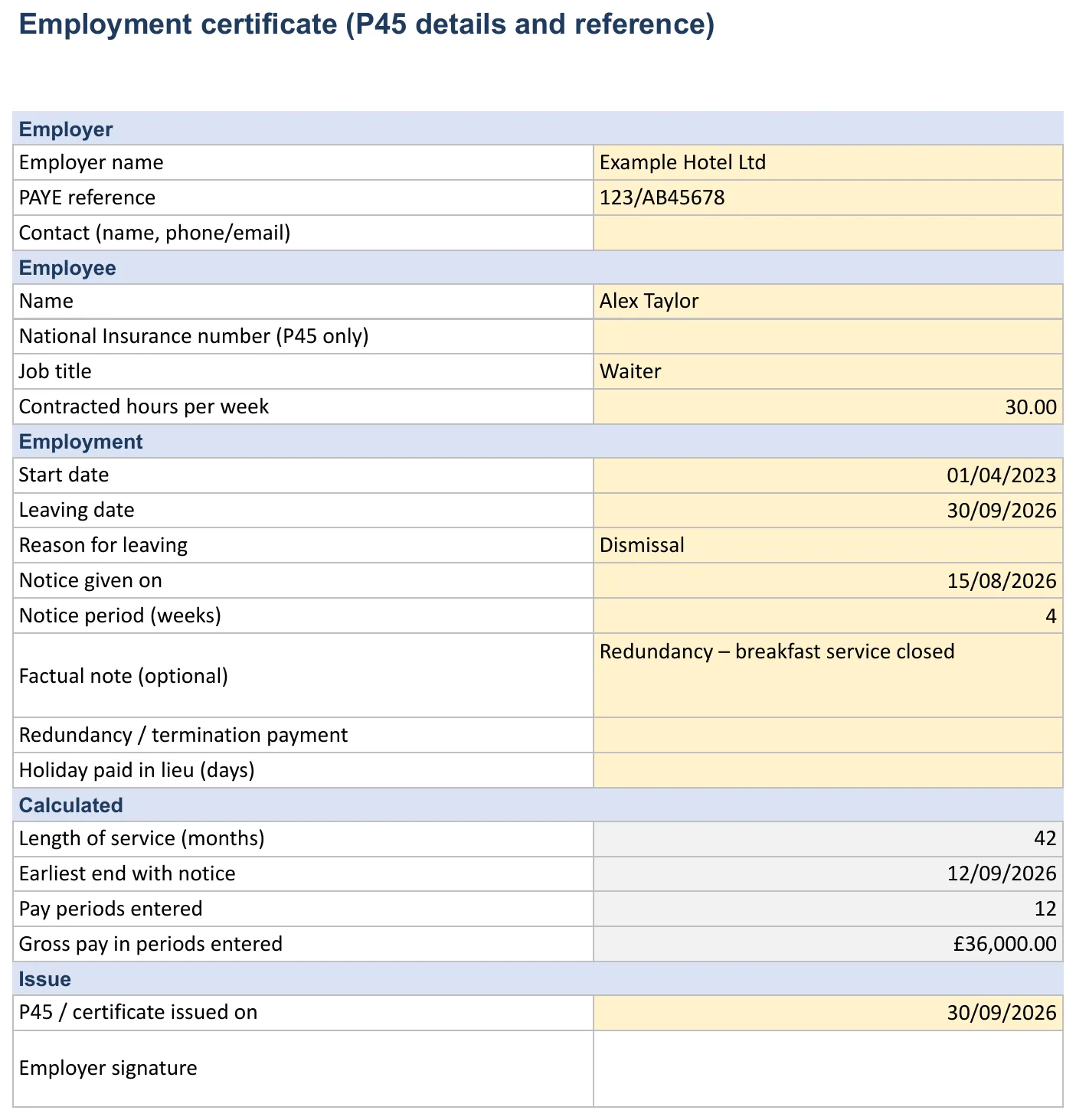
- Employer name
- PAYE reference
- Contact (name, phone/email)
- Name
- National Insurance number (P45 only)
- Job title
- Contracted hours per week
- Start date
- Leaving date
- Reason for leaving
- Notice given on
- Notice period (weeks)
- Factual note (optional)
- Redundancy / termination payment
- Holiday paid in lieu (days)
- P45 / certificate issued on
Automatic
- Length of service (months)
- Earliest end with notice
- Pay periods entered
- Gross pay in periods entered
Dropdowns
Reason for leaving: Dismissal, Resignation, Redundancy, End of fixed-term contract, Mutual agreement
Fill in
- Date (1.)
- Gross pay
- Hours
Automatic
Check
Required details complete; Leaving date not before start; Notice period respected; Pay periods complete (up to 12); Periods within employment; P45 issued on leaving; ℹ
Read only – sources, links and notes.
How to fill in the template
How to fill in the template
- 1
On “Certificate” fill in the yellow fields. Only what is needed – no date of birth, address or health data; NI number only for the P45.
- 2
On “Pay 12 months” enter pay periods with gross pay and hours.
- 3
Review “Checks” (notice, periods, issue date).
- 4
Issue the P45 from payroll (final FPS) and give it to the employee.
- 5
Keep a copy securely and only as long as needed.
Calculations
How the template calculates
Length of service (months)
measures length of service or duration
=IF(OR($B$17="",$B$18=""),"",$B$17+7*$B$18)
Earliest end with notice
2026-09-12
=COUNT('Pay 12 months'!A4:A15)
Pay periods entered
simple reference/arithmetic
Check
counts or raises ⚠ warnings
Required details complete
counts or raises ⚠ warnings
P45 issued on leaving
counts or raises ⚠ warnings
Note
The template drops your entries into the text or form automatically. The checks verify required details, date logic and deadlines and show ✔ or ⚠.
Quick tips
Fill in the yellow cells; grey cells calculate – don’t overwrite them. ✔ = OK, ⚠ = check. Enter times as hh:mm and dates as dates; add new dropdown values on the source sheet first. If you see #VALUE! or empty totals, press Ctrl+Z or reload the template.
Countries
Rules by country
Bank holidays and regions are on the holidays sheet when the workbook supports multiple countries.
verified·estimate·pending
United Kingdom
The “Legal basis” sheet refers to UK law. P45 and RTI apply UK-wide; the notice rules in ERA 1996 s.86 apply in England, Wales and Scotland – check Northern Ireland separately.
Ireland
there is no P45 any more – the employer reports the leaving date in the final payroll submission to Revenue. Minimum notice after 13 weeks’ service: 1 week (under 2 years) up to 8 weeks (15+ years) (Minimum Notice and Terms of Employment Act 1973, s.4). Statutory redundancy needs 104 weeks’ service: 2 weeks’ pay per year plus 1 bonus week, pay capped at €600 a week.
United States
no federal law requires notice or an employment certificate; the WARN Act requires advance notice of covered plant closings and mass layoffs. Federal law does not require the final paycheck immediately, but some states do – check your state’s rules.
Legal basis and sources
| Rule | Source |
|---|---|
| P45 on leaving; final FPS through RTI | GOV.UK |
| Statutory minimum notice | Employment Rights Act 1996, s.86 |
| Statutory redundancy pay | ERA 1996, Part XI; GOV.UK |
| References: accuracy and fairness | Acas |
Guidance only, not legal advice – contracts and collective agreements can differ. The file holds personal data (UK GDPR / GDPR): share it only with people who need it and delete it once the retention period ends.
Checks
Checks and dashboard
Required details complete
Leaving date not before start
Notice period respected
Pay periods complete (up to 12)
Periods within employment
P45 issued on leaving
Formats
Excel, Google Sheets, PDF or Word
- Recommended
PDF (fillable)
Print it or fill it in on screen, without formulas.
- Calculates automatically
- Edit in Word
- Offline
Word (.docx)
Edit the wording freely in Word or LibreOffice.
- Calculates automatically
- Edit in Word
- Offline
Excel (.xlsx)
Calculate, check and archive on your computer – Excel 2016 or later, Microsoft 365.
- Calculates automatically
- Edit in Word
- Offline
Google Sheets
Use it in the browser and share it with your team – via File › Make a copy.
- Calculates automatically
- Edit in Word
- Offline
Print, share, save
Print: File › Print → A4 (UK, Ireland) or US Letter (US), choose orientation, scale “Fit to width”, repeat frozen rows.
PDF/Excel: File › Download › PDF or Microsoft Excel (.xlsx).
Your own copy: File › Make a copy. Share: “Share” top right – ideally “Viewer” for the team.
Limits of the template
Formula cells are only protected with a warning, and a spreadsheet keeps no change log: anyone who can open the file can edit it.
If several people need to plan or record at the same time, software such as Ordio is easier.
Related templates and tools
- Time trackingDigital alternative to Excel — start a free trial.
- TemplatesEvery free Excel and Google Sheets template in one place.
- Digital employee files in Ordio
- Employment Reference Letter Template – free for Word, PDF and ExcelWrite a fair, accurate employment reference step by step. Free to download for Excel, Google Sheets, Word and PDF. Free for Excel and Google Sheets.
- Termination Letter Template – free for Word, PDF and ExcelCreate a resignation or termination letter and calculate the notice period automatically. Free to download for Excel, Google Sheets, Word and PDF.
- Job Description Template – free for Word, PDF and ExcelDescribe a role in a structured way: duties with time shares, requirements and responsibilities. Free to download for Excel, Google Sheets, Word and…
Proof of employment: what people actually ask for
An employment certificate, also called a proof of employment letter or employment verification letter, confirms that someone works or worked for you. Landlords, mortgage lenders, visa offices and new employers usually want the same few facts:
- employer name and address, with a contact who can confirm the letter;
- employee name and job title;
- start date, and the end date if employment has ended;
- contracted hours per week and full-time or part-time status;
- pay, but only if the employee asks you to include it.
Include only what the recipient needs. A date of birth, home address or health information does not belong in a proof of employment letter. In the UK the National Insurance number is only needed on the P45, not on a letter for a landlord.
UK: the P45 is a separate, statutory document
When an employee leaves, the UK employer must report the leaving date to HMRC in the final Full Payment Submission (FPS) through RTI and give the employee a P45. The P45 carries the tax code and pay and tax to date, so the next employer can operate PAYE correctly. The template collects the details you need for it, including up to 12 months of pay history, but the P45 itself comes from your payroll software.
| Document | Who needs it | Required by law? |
|---|---|---|
| P45 | Employee and next employer | Yes, on leaving (UK) |
| Proof of employment letter | Landlord, lender, visa office | No; give it on request |
| Reference | Prospective employer | No general duty (see the reference template) |
Ireland and the United States
- Ireland: there is no P45 any more. The employer reports the leaving date to Revenue in the final payroll submission, and the employee can see their employment details in their Revenue account. A proof of employment letter is still common for landlords and banks.
- United States: no federal law requires an employment certificate or a notice period. Employment verification for lenders is usually handled by HR or a third-party verification service, often with the employee's written consent.
Pay history and the redundancy angle
The "Pay 12 months" sheet records gross pay and hours per period. That supports income checks by lenders and helps when calculating notice pay or redundancy pay. In the UK, statutory redundancy pay needs two years' continuous service. In Ireland it needs 104 weeks: two weeks' pay per year of service plus one bonus week, with weekly pay capped at €600. Check the "Checks" sheet to make sure the pay periods fall within the employment dates before you sign.
Example: a letter for a landlord
To whom it may concern,
We confirm that Alex Taylor has been employed by Example Ltd as a Shift Supervisor since 3 March 2025, on a permanent contract of 37.5 hours a week. At Alex's request we confirm a gross annual salary of £28,500. For questions, please contact HR at hr@example.co.uk.
That is all a landlord usually needs: the job, the start date, the hours and, if asked for, the pay. Leave out reasons for absence, performance and anything about health.
Common slips
- The letter shows salary when the employee did not ask for it.
- The end date is missing for someone who has left, so the letter suggests they still work for you.
- Nobody signs, or the contact named cannot confirm the details when the landlord calls.
Which document does the person actually need?
| Request | What to give | Notes |
|---|---|---|
| Landlord or letting agent | Short employment letter: job title, start date, contract type, hours; salary only if the employee asks | Confirm with the employee what they want disclosed |
| Mortgage lender or bank | Letter plus recent payslips; some lenders send their own form | The "Pay 12 months" sheet gives the figures |
| New employer (UK) | P45 for tax, plus a reference if requested | The P45 is statutory; the letter is not |
| Visa or immigration | Letter with salary, hours and start date on headed paper | Check the authority's own checklist first |
| Benefits claim after leaving | Letter with start and end date and reason for leaving | Use neutral wording for the reason |
Sample wording: still employed vs left
Current employee:
We confirm that Jordan Lee has been employed by Example Ltd as a Kitchen Supervisor since 1 September 2023. Jordan works 40 hours a week on a permanent contract. This letter is issued at Jordan's request.
Former employee:
We confirm that Jordan Lee was employed by Example Ltd as a Kitchen Supervisor from 1 September 2023 to 31 August 2026.
Keep the two versions apart. A letter for someone who has left must show the end date, or it suggests they still work for you.
Who signs, and how to send it
Sign as someone who can confirm the facts, usually HR or the line manager, and add a phone number or email for verification. Send it to the employee, not straight to the landlord or bank, unless they have asked you to. The letter contains personal data, so the employee decides who receives it.
For employees: what to check before you hand it over
- Your name is spelled as on your ID, because lenders and visa offices compare documents.
- The start date matches your contract and payslips.
- Salary is shown only if you want it shown.
- The letter is dated recently. Many lenders want documents from the last 30 days.
Archiving
Keep a copy with the date issued and who asked for it. If the same person asks again six months later, you can reissue it quickly with updated figures instead of starting from scratch.
Common mistakes
- The job title in the letter differs from the payslip, so the lender queries it.
- Hours are given as "full time" with no figure. Write "37.5 hours a week".
- The letter is signed by a colleague who can't confirm the facts if the landlord calls.
- An old template still shows a previous company address or logo.
- The letter promises future employment ("will continue to be employed"), which you can't guarantee. Write "is employed on a permanent contract" instead.
If a lender or agency sends its own verification form, fill in that form rather than a letter. It usually asks for the same facts, but in the order its underwriters expect.
Date every letter and use headed paper or a work email address, so the recipient can check where it came from. Keep the verification contact up to date as well. Keep a copy of every certificate you issue in the personnel file.
File the signed proof of employment with the employee record
The workbook drafts the letter. Ordio stores the signed copy.
Documents in one record
Certificate, reference, and contract stay with the employee, including after they leave
A copy you can find
Keep the preparation sheet and the BEA confirmation in the same file
Faster at exit
Pay figures from payroll, so HR is not retyping them into the agency form
For sites with high turnover
Hospitality, retail, and care teams issue these certificates often
With Ordio:
See how Ordio supports compliant HR
See automatic checks improve audit readiness · No obligation · 15 minutes
More free templates
Discover more Excel templates for planning, time tracking and HR.
Frequently asked questions about German employment certificate
What is the difference between an employment certificate and a reference?
An employment certificate confirms facts only: dates of employment, job title and, if asked, pay. A reference can also assess performance or conduct. In the UK an employer generally does not have to give a reference unless it has agreed to in writing or a regulator requires it, and any reference it gives must be fair and accurate. (Source: acas.org.uk)
Is an employment certificate the same as a P45?
No. The P45 is a statutory UK tax document given when someone leaves. A proof of employment letter is an informal confirmation of the job, dates and hours that you give on request.
Is the employment certificate template free, and does it work in Excel and Google Sheets?
Yes. You download it free of charge after a short form and get an Excel file (.xlsx, Excel 2016 or Microsoft 365) and a Google Sheets copy, plus a fillable PDF and a Word document. Excel and Sheets contain the same 6 sheets: Instructions, Certificate, Pay 12 months, Checks, Legal basis, Ordio.
Which countries does the template cover?
The template covers the United Kingdom, Ireland and the United States. The country notes in the file set out the rules for each: United Kingdom: The “Legal basis” sheet refers to UK law. P45 and RTI apply UK-wide; the notice rules in ERA 1996 s.86 apply in England, Wales and Scotland – check Northern Ireland separately. Ireland: there is no P45 any more – the employer reports the leaving date in the final payroll submission to Revenue. Minimum notice after 13 weeks’ service: 1 week (under 2 years) up to 8 weeks (15+ years) (Minimum Notice and Terms of Employment Act 1973, s.4). Statutory redundancy needs 104 weeks’ service: 2 weeks’ pay per year plus 1 bonus week, pay capped at €600 a week. United States: no federal law requires notice or an employment certificate; the WARN Act requires advance notice of covered plant