Improvement
Ordio Terminal: new design, clearer clock-in overview
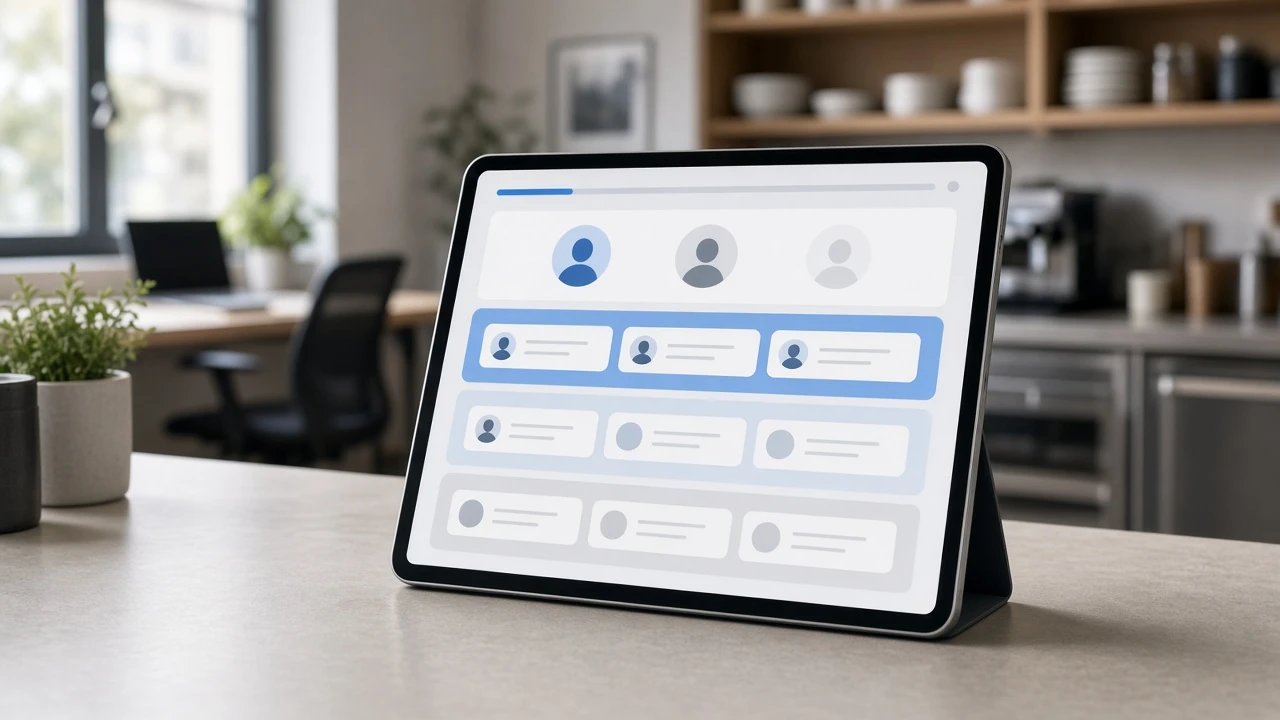
In short: The Ordio Terminal has a new design. The home screen sorts your team into three groups, each tablet can be configured on its own, and you choose when to switch. Until then, the classic design stays active.
Previously, everyone’s shifts sat in one list or as tiles, and it was hard to see who should clock in now, who was already working, and who had no shift. The new home screen fixes that.
Fresh look
The Terminal now matches Ordio on web and in the app: calm, clear and easy to read. First and last names use two lines so long names stay visible. Weak or missing internet is shown at the bottom of the screen.
Home screen by group
Your team is split into three areas:
- Clock in now
- At work
- Clock in without a shift
Each card shows area and shift start. Use Search to find anyone by name. Open team checklists from the home screen and complete them with your PIN, with or without a shift.
Settings per terminal
Each tablet has its own settings behind the gear icon:
- Home screen
- When clocking in (read and confirm daily info and broadcasts)
- Photo on clock-in
- Time format
- Terminal language
In the new design, a tablet can also show 12-hour time. 24-hour time remains the default in every language.
On every tablet, including classic design
- 22 languages: The same languages as the Ordio app, including Turkish, Ukrainian and Romanian.
- Short break: Employees can log a short break when your business uses it.
- Photo: Clock-in photos work on more Android tablets; the screen no longer stays white afterwards.
- Checklists: While someone answers a checklist, the Terminal stays on that screen and returns to the home screen after one minute without touch.
How to switch
In the classic design, the home screen shows the card “The Terminal in the new design”.
- Tap Preview new design.
- Sign in with email and password.
- Tap Activate new design.
Anyone whose role includes Start terminal can switch. On a new tablet, pick New or Classic at sign-in (top right). You can switch back anytime via the gear icon, unlock your account and choose Design.
Good to know
- What stays the same: Shifts, clock-in times, break rules and permissions are unchanged.
- Your team: Clock-in works as before: tap a name, enter PIN, press and hold briefly. Switch outside peak times and tell your team in advance.
- Update: Get the latest version on the App Store and Google Play. iPads need iPadOS 15.1 or later.
- Managed tablets: If devices are managed centrally (MDM), check whether app updates install automatically. In kiosk mode, an update may wait until the app is closed.
- Sign in again: After updating, you may need to sign in on the tablet again. Keep your credentials handy.
What it means for you
- More overview on the tablet: The home screen shows who can clock in now.
- Each tablet fits its location: Home screen, messages, photo, time format and language per device.
- Switch when it suits you: You pick the timing per tablet and can revert anytime.
Explore: shift planning, time tracking and payroll.
Never miss a release
Email updates on what's new in Ordio: plus practical tips on scheduling, time tracking and HR. Free, unsubscribe anytime.
- Hear about new features first
- Guides & glossary tips you can use
- One-click unsubscribe
More product updates
Discover more features and improvements from past releases.

Frequently asked questions about Ordio Terminal
Do I have to switch all tablets at once?
No. You enable the new design per tablet when it fits each location.
Do shifts or clock-in rules change?
No. This is about layout and device settings, not the underlying logic.
Who can activate the new design?
Any role with permission to start the terminal.
Can we go back to the classic design?
Yes. Use the gear icon on the home screen, unlock your account and change the design.
Outstanding ratings
Thousands of businesses rely on Ordio: and independent platforms recognise the product.

40 reviews

87 reviews
New Ordio features for your business?
You're reading our product updates, we'll call and show what's relevant for shift planning and time tracking right now.