New feature
Configure columns individually, in employee list and working time
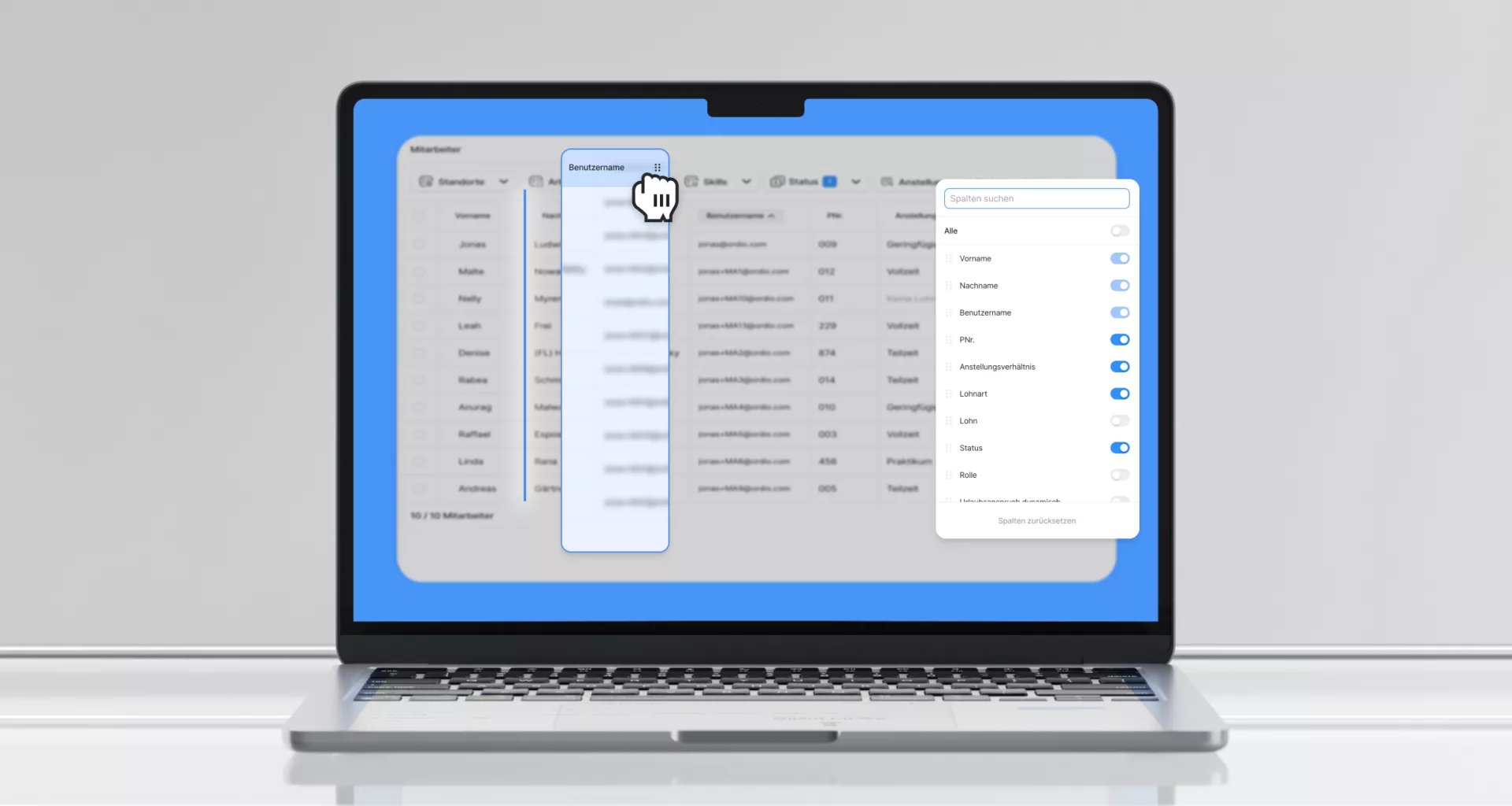
Summary: Reorder and hide columns in the employee list and working-time report.
Drag headers or use the column manager to match how your team works.
Drag-and-drop columns
Grab a column in the header and move it where you need it.
Column management
- Show and hide columns
- Reorder via drag-and-drop, including hidden columns
- Search columns in the dropdown
- Reset to defaults with one click
Settings persist
Column order and visibility are saved per table.
Export follows your view
In the employee list, exports include only visible columns in your chosen order.
Faster sorting in the working-time report
Sorting now loads page by page for most columns, faster with large datasets.
Available now in the employee list and working-time views.
Explore: shift planning, time tracking and payroll.
Never miss a release
Email updates on what's new in Ordio: plus practical tips on scheduling, time tracking and HR. Free, unsubscribe anytime.
- Hear about new features first
- Guides & glossary tips you can use
- One-click unsubscribe
More product updates
Discover more features and improvements from past releases.

Outstanding ratings
Thousands of businesses rely on Ordio: and independent platforms recognise the product.

40 reviews

87 reviews
New Ordio features for your business?
You're reading our product updates, we'll call and show what's relevant for shift planning and time tracking right now.